First you need to get the file. Then you need to run the setup. Once the software is installed, you need to open the folder where the setup was installed and run the.exe file that was installed with it.
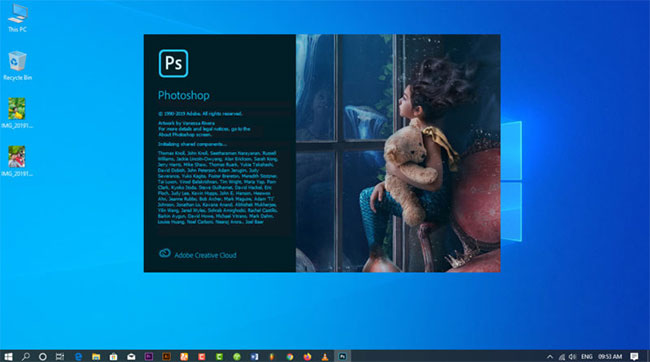
To start Adobe Photoshop, click the application icon on the desktop or start menu. When the software starts, you will be greeted with a welcome page. Click on the option Install to activate the full version of the software. Once activated, you will be ready to use the software. The software will create a shortcut on the desktop. To use the shortcut, just double-click it to start the software.
The Fast Workflow panel is an experienced Photoshop user’s best friend. It allows you to quickly access the tools, commands, layers and more for those tasks you do all the time in the application. The panel gives you precise previews of your layers, highlights and weapons that you can use to work your magic faster and easier. As in previous releases, more tools and commands are available with just a reach to the right.
People use Adobe Photos it all day long to edit pictures. However, Photo is just an editing application not a complete software for all photo editing tasks. Along with the introduction of support for the new RAW format in Photoshop CS6, all Photoshop users are now able to edit their RAW photos. Adobe has also introduced Adobe Camera RAW support, so you can quickly open and edit your RAW photos easily using these tools. A basic photo editing work flows and file management remains the same as with older versions. It’s the same for all users.
Intent Shape functions allow you to make real-time edits combining dynamic editing with design-friendly features. You can use readily available shapes to create free-form text, line art, callouts, arrows and more.
Both CS5 and CS5.1 artists will get a set of more than 200+ action tools like shapes, masks, text tools, and adjustment layers for super fast, easy and versatile editing of whole files or up to five individual layers. A dynamic action toolkit allows users to begin and edit their project on any of the layers or assets in a file.
Edit all your text easily and accurately in Adobe Photoshop. Text tools let you edit the font of text and use templates to help you create new, unique, and novel text. You can use this to add custom text and logos to your design. There are also many other tools within Adobe Photoshop which allow you to adjust your images and transform them into something quite unique and different. Grab the hue, saturation, and lighting filters and apply them to your photo. You can adjust their opacity and add or subtract details as well. Use the Curves tool to create smooth, natural-looking adjustments to your image and adjust the contrast. And don’t forget the Eraser, which is used to delete any unwanted portions of your image. Be creative, have fun, and create!
InDesign is not only used for creating newsletters and magazines but also for creating books, labels, and much more. The tool allows all of the documents you create within your software to be printed and shared. Additionally, the program is very powerful, allowing you to create and create right before you finish. For instance, you can create a cover page or jacket for your book, print and design a book, add all the content from your other files together, and then print it all out. It’s an extremely functional program.
“I’m sure that on some computers, you can run the full Photoshop, but in my experience, once you get to at least 50% of the features, the performance will be unacceptably slow.”
When Google introduced Chrome in the late 1990s, it wasn’t intended as a web browser. However, given its open source nature and near-limitless support for web apps, that was quickly changed.
Adobe has also made good use of the open source browser technology WebAssembly, a low-level programming language designed specifically for compiling code to the web.
For example, in 2018, Adobe announced that it was working on an extension for its text editor, Premier Pro, that would help you edit in the browser with web components and any other such features.
As of 2021, the company has now opened up the Adobe Photoshop public beta to creative professionals and hobbyists interested in Adobe’s Web Assembly implementation. This will allow developers to access Photoshop on their web pages without having to run the application locally.
Note that you don’t have to download Photoshop to access it—though you can as you wish. For those users who prefer viewing over reading, the online version is also available in multiple formats.
So, what’s next for Adobe on the web?
Image courtesy of Flickr user came originally from flickr.com . Released under a Creative Commons CC-BY-SA 4.0 License.
3ce19a4633
Created in collaboration with the Australian government, the City of Hobart—and most recently Japan’s largest third-party logistics group, Japan Post—is a massive database that lists the 2.5 million addresses in the country, that can be displayed through a unique geographic locator interface. Simply drag and drop items to different locations, and the resulting image can then be used to create a geographic map.
The month of May 2019 brought a new live webinar every 3rd Wednesday of the month for those who missed the April live webinar and for July – we managed to deliver a pre-recorded webinar. Google Calendar marked this as a ONE-TIME event.
Explore the powerful software that is always there, ready to help you free up time on your workflow by providing straightforward solutions to your creative problems. Whether you are working with photographs, drawings, mixed media, layers, or smart object, Photoshop is the tool that will help you produce stunning results.
…this book will walk you through the full spectrum of tools and workflow available in Photoshop CC. From adding that finishing flourish to creating a monumentally fun game-changer project, this book covers all of Photoshop’s capabilities and creative workflows.
If you’ve been looking for a range of amazing free photograph editing tools for your editorial and personal projects, head on over to Envato Market for everything from beautiful photo styles to CSS and graphic designs.
Thanks for visiting, and keep an eye out for the next instalment in our series, where we’ll explore some of the newer features at Adobe, in the move to better unify the platform and bring these tools to life on both Windows and MacOS, along with other features such as Adobe XD 2020.1, Project Catalyst 2020.1, and the return of Adobe XD! Stay tuned to PDF Central for all the latest on all the latest software and learning resources to help you make the most of your design and photo editing software in the coming months to come.
memento shader brushes for photoshop free download
brushes for adobe photoshop free download
brushes for adobe photoshop cs6 free download
cloud brushes abr for photoshop free download
abr brushes for photoshop free download
assorted brushes for photoshop free download
artistic brushes for photoshop free download
angel wings brushes for photoshop cs6 free download
leaves brushes for photoshop free download
download free label brushes for photoshop
Stability of legacy apps/: With the transition to native APIs, we’ve also had to retire and retire a substantial number of our legacy native APIs and tools. Because of this, we’ve had to retire a number of technologies that were actively supported by Adobe but not directly addressed by Flash. What was once a list of tools that overlayed and reduced quality was significantly reduced to one tool—the Photoshop app , which is now installed by default.
The earlier Photoshop app was depreciated; while we were working on the new native features. The Photoshop app let you open and edit Photoshop RAW (DNG) photographs on a Mac in a higher fidelity than with previously, but also with limitations about color space, file size and data storage.
What will happen to 3D support?: 3D support will be removed from all Adobe applications in response to this transition and Adobe will continue supporting Flash in the course of our 2015 product
For most desktop applications launched today, quirks of low-level system calls and structures are used to implement file systems, threads, memory, network, timing, or other areas of the operating system.
However, with time, Photoshop has become lackluster in terms of 3D and heavy to use (and has significant issues with performance). Users working with 3D products – whether it be 3D animation, visualisation, design or print – are encouraged to explore Adobe’s new Substance 3D collection (available for free at adobe.com/substance3d), which represents the next generation of 3D tools from Adobe. Additional details on discontinuation of Photoshop’s 3D features can be found here: Photoshop 3D common questions.
4. History panel – It can be used to store and organize all your past projects and gives you e-mail alerts whenever there is something new. This feature allows the user to see all the modifications made over a project.
1. Selective editing – It is one of the most powerful tools for image editing. It is used to crop images, add effects to images, insert text, etc. This feature allows the user to make some changes on the fly and apply much faster than by using the traditional methods.
We are making these changes to our 3D features to allow us to focus our development resources on creating the best tools for our 2D users. We’re making this change to ensure that future developers aren’t trying to solve the same problems that our 2D users are already solving today.
A new selection tool in CorelDRAW is much easier to use, and allows you to select part of an object or a group of objects in an image, and then to transform the selected objects. A new feature enables you to generate additional layers from a PDF artwork, making the PDF artwork more flexible, and improving the workflow when it comes to creating images for projects.
The best part about Photoshop is that it doesn’t come with an enormous price tag. Photoshop is a very popular software in the graphic creation industry. From Business Graphics to photography and graphic design to photo manipulation, Photoshop is the one that you can go to for the most advanced needs. Over time, Photoshop has become a bit more efficient with different versions. However, the version that you need is the one that you need. If this is your first time using Photoshop, it may be a little overwhelming. But let us keep you on track.
https://datastudio.google.com/reporting/d2112ba9-f970-482c-bf73-94be4a2a9688/page/p_qvmzalcs1c
https://datastudio.google.com/reporting/e7e2ab2b-4478-48f6-a964-329b9d125c26/page/p_oby85jcs1c
https://datastudio.google.com/reporting/ae5925e5-13f9-4103-8034-4eebff60365c/page/p_dyr3sjcs1c
https://datastudio.google.com/reporting/4fba8841-cc34-4899-ad64-c1492fc1761e/page/p_tlq15ics1c
https://datastudio.google.com/reporting/4d264c21-fbc2-4460-91f6-efeff08992fc/page/p_xnc13ics1c
https://datastudio.google.com/reporting/55219039-4d6f-4743-8faf-4992b9f3e7b6/page/p_tudhhics1c
https://datastudio.google.com/reporting/5f9b042c-1c8f-4c55-86d5-ccbbfbf88ef3/page/p_ejkmcics1c
https://datastudio.google.com/reporting/1811db3e-9d38-45a6-96be-80391b53932c/page/p_1q3t0hcs1c
https://datastudio.google.com/reporting/88eff5fd-2f1c-485d-a49f-c2a6df4fd2ca/page/p_gkv8xhcs1c
https://datastudio.google.com/reporting/6664f104-8dc3-43ed-b020-633c9b7fc4fa/page/p_e03oyhcs1c
https://datastudio.google.com/reporting/a867d7bc-1f5d-4a08-8bed-2a83816d76de/page/p_em0x5gcs1c
https://datastudio.google.com/reporting/086347cf-1f26-429c-86aa-f0b9ea4590a3/page/p_e1l70fcs1c
https://datastudio.google.com/reporting/fc242301-1f87-4ba1-9d68-c8ac0fcbe1ca/page/p_abvp5ecs1c
https://datastudio.google.com/reporting/40138079-102c-4ee9-b5a8-275643fe77a9/page/p_pt687ecs1c
https://datastudio.google.com/reporting/bae012e9-e077-4936-888a-6dc4f1cdcc50/page/p_x1d14dcs1c
1. Correcting images with layers and masks: While Photoshop is the perfect tool for designing images with multiple layers and textures, it can’t match the speed of other graphic design tools. You can work quickly and accurately with layers and masks, without complex menu commands and complicated selections.
2. Image overlay: You can do more than just view the content of your images. You can even edit them. You can overlay text over an image, add other images behind it, merge any number of images, merge multiple photos into a single image, easily change the color cast in any photo or even add a pattern to an image. The list of image editing options is endless.
3. Photo retouching: You can correct red-eye, crop photos, remove spots and freckles, fix orange noses and bald spots, edit defocused regions of an image. Photos, landscapes, and even posters can become amazing. You can remove unwanted elements from an image, and even add special effects like removing ink smudges, adding a haze, and other corrections. Professionals have used Photoshop for years to retouch photographs.
Many video files carry metadata information. It’s essential to watch this metadata information when editing videos. There are two types of metadata information in video files, main and auxiliary data. Main metadata information is the index of the video and other important data like the time code, chapters, and the file size. Auxiliary video information doesn’t have to be stored on the video file, and it can be stored on other formats like JPEG, MP3 or MP4 files. If you want to edit the metadata information, then you can use the video information files on your computer. You can either use an online service like Smart Downloader or one of many free video meta data editing tools.
In a way, Photoshop is a powerhouse of editing features, similar to the range of Mustang and Protools. By mixing different elements of the best tools, each one of them add something different, and all together you get the best tool of the modern era. Using Photoshop, not only is the design exquisite, it is also easy to get started, and helps the workflow. It is an excellent photo editor for Mac users with some basic knowledge of the interface. Its basic version even comes free.
The good news for Windows users is that Photoshop comes for free, and works only on Windows. It does not run on Linux or Mac, so you need to buy the license to use the software. However, if you want to master the Photoshop engine, you can buy the premium version. For users who are looking for professional editing services, they can put their order.
Adobe Photoshop is one of the most advanced tools available in the world. Whether you are a beginner or an experienced photographer, the Adobe Photoshop provides you with the best features that will help you bring your goal to life. Let’s take a look at some of its features:
Image editing and retouching: Having different tools and tools to edit your photos like photo retouching, and seamless and tilt-shift editing to enhance them are all included in the designing and editing of the images. You also have a feature to apply cartoon features and focus on your subject. There are also tools to adjust color and tint, and techniques. All of them make the images look fresh and catchy. You will feel surreal as the image changes before your eyes.
https://mondetectiveimmobilier.com/2022/12/28/download-free-gradients-for-photoshop-patched/
https://mentorus.pl/download-free-adobe-photoshop-cc-hacked-3264bit-2022/
http://webguideus.com/?p=3000
https://educationcollege.info/grain-shader-brush-set-for-photoshop-free-download-exclusive/
https://cefcredit.com/adobe-photoshop-2022-version-23-0-2-download-product-key-windows-10-11-latest-2022/
http://le-jas-de-joucas.fr/en/walt-disney-font-for-photoshop-free-download-cracked/
http://champstransport.com/?p=1128
https://fotofables.com/photoshop-2020-license-key-full-license-keygen-x32-64-latest-version-2022/
https://victresslife.com/download-photoshop-portable-windows-10-64-bits-link/
https://earthoceanandairtravel.com/2022/12/28/photoshop-2021-version-22-product-key-full-patch-with-serial-key-2022/
https://jugueteriapuppe.cl/wp/2022/12/28/adobe-photoshop-download-7-0-windows-7-fix/
https://teenmemorywall.com/download-adobe-photoshop-2021-version-22-1-1-license-key-full-for-windows-x64-hot-2023/
http://dreamzhunt.com/download-free-text-styles-for-photoshop-__top__/
https://eskidiyse.com/index.php/photoshop-background-wallpaper-download-__link__/
https://psychomotorsports.com/snowmobiles/98095-download-photoshop-2022-version-23-0-1-product-key-for-mac-and-windows-update-2023/
https://www.dominionphone.com/adobe-photoshop-2021-version-22-0-0-download-free-with-keygen-3264bit-new-2022/
https://www.top1imports.com/2022/12/29/photoshop-free-apk-download-for-pc-2021/
https://choicemarketing.biz/adobe-photoshop-2022-version-23-2-full-product-key-with-keygen-2022/
https://parsiangroup.ca/2022/12/download-photoshop-logo-design-free/
https://entrelink.hk/political/download-free-adobe-photoshop-cc-2019-version-20-with-registration-code-incl-product-key-updated-2022/
In fact, here at Focal Press, we’ve already made the move to the new program, and we’re excited to let you see just how well the transition has gone. We’d love to hear your feedback on the new features and how they’ve changed your working lives.
With every new version, Photoshop is developed, from a simple small photo editing tool to an industry-leading software that changed the global graphic designing and multimedia industries standards. Every new version has some new features introduced, but there are a few tools that are being tested with time and remain sturdy and highly important to the designers. Here are some tools and features that are proved as the best of Adobe Photoshop:
Adobe has recently announced the new feature releases for Photoshop for 2021, as well as a range of new additions to Photoshop Elements. On Photoshop, there’s a number of new and exciting features, including reimagined filters powered by Adobe Sensei, which allow you to change the direction of a person’s gaze in seconds (it’s pretty trippy stuff!).
If you work with the lower-end versions of Photoshop, from 5–9 to 11–10, this book will give you a first-hand look at the core editing processes covered in each lesson. Browse through the book, explore additional examples and tips, and learn some best practices for Adobe Photoshop classes and practices. If you work with the upper-end versions from 11–10 to CC–2014, be sure to refer to the book’s companion site to view step-by-step tutorials, exercises, and answers to practice questions.
Adobe Photoshop allows you to open, modify, and save most image and graphics files. It is the top photo-editing program available and is a must for anyone interested in digital photography. Photoshop allows you to crop, resize, add special effects, remove backgrounds, create layers and many more editing features. It also includes a wide array of other tools that enhance the graphic design process.
Photoshop is the flagship software for digital photo editing and graphic design. Using layers, effects, and tools, photographers, illustrators, and graphic artists can edit photos and other images, including text and drawings. Photoshop CS5 ‘s new features include path-based brush tools, simple navigation tools, and new rendering effects.
Adobe Photoshop gives you everything you need to edit photographs or exciting projects such as Web pages. It is the most powerful graphic design tool, can fix and prepare RAW images, and can help you create stunning real-life pictures. In addition to that, you can use your favorite programs together with Photoshop, and you can enhance your projects in ways you never thought possible.
Adobe Photoshop is the best image editing software you can use. It is used by millions of professionals and amateurs all over the world. It is the best tool to edit your photos and to create Photoshop images. It is feature-packed and also highly customizable. You can use the software in ways that you never thought: you can instantly resize your images, transform the look of an image, convert images to a different format and many more. With the latest version you can save your images in RAW format, and if you have an Apple Mac you can even develop your RAW images on your computer.
Adobe Photoshop CC is available for macOS, Windows and other platforms from the Mac App Store for $9.99 USD per year or as a perpetual license for $4,995. Photoshop Creative Cloud subscribers may upgrade from CS5 to CS6 for $3,995 or Creative Cloud Photography Suite by subscribing to a subscription right from within Photoshop. Graphics suites and the creative cloud suite include Pilot, Luminance and Adobe Stock tools. To learn more, visit Adobe Creative Cloud, or check out the Adobe Photoshop resource center to learn more about the program.
Get access to the latest tutorials, design projects and resources for the best in creative and collaboration technology from the experts at Envato. Join the community and get your chance to win a free year subscription!
This Summer, Adobe has made a commitment to provide important accessibility updates to Photoshop on the web to make it simpler and more intuitive to use. Adobe’s commitment to creating accessible products for people with disabilities will continue to be a priority. The new Photoshop will be able to read your selection, highlight your image, and give you precise positioning and deconstruction tools so that you can deepen your understanding of your images. The new features will include common features such as face-recognition, tracking, and templates that were previously only available in Photoshop.
The fast and responsive interactive brushes and patterns of the Substance line of products are now available in Adobe Photoshop. These brushes can be used to give your images that 3D look. This great new feature will transform your 2D photography and illustration work into 3D—at the click of a button!